
Blue Origin
Test & Flight Operations
As a Senior UX Designer within Blue Origin’s Enterprise Technologies,
I specialize in optimizing complex aerospace data into effective, intuitive interfaces.
-
Innovation: Researched and evaluated LLM integration approaches for technical workflows.
-
Impact: Design work that secured project funding. Another earned a Lift-Off Award.
-
Vision: Strategic research featured at ISSRDC 2024 and integrated into NASA collaboration.
-
Scale: Contributed journey map components to the enterprise design system.
To respect NDAs, all visuals are sanitized or recreated to focus on strategy, logic, and impact.

Mission Management & Strategic Vision
Bridging Engineering Workflows and Business Expansion
The Challenge
When I joined the team, the mission management and payload telemetry landscape was technically dense and differentiated across five distinct business units. Through this discovery work, we uncovered user needs, challenges, and opportunities to leverage learnings across our different business segments.
The Strategy: Multi-Divisional Discovery
To synthesize a "North Star" vision, I led a ux design and research initiative on Payload Mission Management:
-
Cross-Functional Interviews: Engaged a diverse cohort—including Mission Management, Systems Engineers, Integrators, and Operators.
-
Journey Mapping: Facilitated collaborative sessions with mission managers, engineers, and payload managers to map the end-to-end payload lifecycle, identifying critical friction points in the process, and voice of the customer.
-
Roadmap Prioritization: Translated insights into intake planning, user needs, and business requirements.
The Design Philosophy
-
Customer-Centricity: Reframed and changed focus from "what we build" to "how the customer experiences the mission."
-
Unified Narrative: Developed a consistent visual and functional language that allowed stakeholders across multiple internal teams to see their work as part of a single, cohesive ecosystem.
-
Scalable Frameworks: Designed the journey maps and research artifacts to serve as a repeatable blueprint for future service models.
The Impact
The research shaped a design framework later featured at ISSRDC 2024 by Orbital Reef's Chief Scientist, demonstrating the vision for future space habitat services..
View Conference Public Technical Session (Slide 7)

External Partner Data Portal & Orbital Access
From Conceptual Pivot to Cross-Functional Adoption
The Challenge
The vision was for a research scientist to open their mobile app on a Sunday morning and check the health status of their science experiment from home. We wanted to enable external researchers and partners to monitor on-orbit experiments in real time, without requiring a physical presence in mission control or compromising security.
The Strategy: Resilience
Midway through discovery, the project's scope and priorities shifted. Rather than letting the work stall, I took an "intrapreneurial" approach to keep it moving:
-
Reframing the Value Proposition: Synthesized the existing research and technical thinking into a clear, high-level case for why this capability mattered beyond its original scope.
-
Stakeholder Alignment: Led concept work and presentations across teams to show how a secure external portal could solve real customer bottlenecks.
-
Concept Refinement: Facilitated discovery sprints to ensure the proposed solution met the rigorous security and data-handling requirements of a multi-tenant platform.
The Design Philosophy
-
Accessibility for Non-Experts: Focused on reducing the cognitive barrier to entry, designing an intuitive interface that made complex telemetry streams understandable for external researchers.
-
Modular Architecture: Designed the portal as a templated solution, so different teams could plug their own data streams into a unified UI.
-
Secure Collaboration: Prioritized a self-service model for requests, letting partners interact with mission assets through a secure, gated workflow.
The Impact
The concept work became a reference point for how the organization could approach external partner access going forward, and my design established the foundational visual and functional template for future work in this space — a North Star for how the company could let external partners engage with mission assets securely.

Next-Gen Procedural Tooling
Optimizing Reliability and Safety in Aerospace Operations
The Challenge
In aerospace testing and launch operations, procedures are the "scripts" for success. The existing legacy tools were often fragmented, leading to high cognitive load for engineers during time-sensitive engine tests and launch facility preparations. My goal was to design a next-generation procedural tool that could handle extreme complexity while maintaining absolute clarity and safety.
The Strategy: Immersive Discovery
To understand the high-pressure environment of a test stand or a console, I went beyond the desk:
-
Direct Observation: Conducted multiple site visits to witness live test operations, observing how engineers interacted with software under real-world stress.
-
Co-Creation Workshops: Led collaborative sessions with Test Engineers and Launch Operators to prioritize features that would actually reduce error rates in the field.
-
Rapid Prototyping: Developed interactive prototypes to simulate high-velocity data environments, ensuring that critical alerts and procedural steps remained the primary focus.
The Design Philosophy
-
Complexity without Clutter: I focused on "progressive disclosure," optimizing the experience for engineers by showing exactly what they needed for the current step while keeping the broader mission context accessible.
-
Feedback Loops: Integrated real-time validation into the UI so that operators received immediate confirmation of successful command execution.
-
System Thinking: Collaborated with development engineers to ensure the MVP was technically viable for the unique constraints of live telemetry and legacy hardware, solving for critical user needs.
The Impact
The MVP project was successfully tested with internal customers and added value to mission-critical preparations. It earned support from business owners and director leadership. The project team received a "Lift-Off Award" for innovation, recognizing the future procedural tool's significant impact on improving operational readiness and safety in the field.
High-Volume Telemetry Analysis
Streamlining Data Synthesis for Test/Flight Reviews
The Challenge
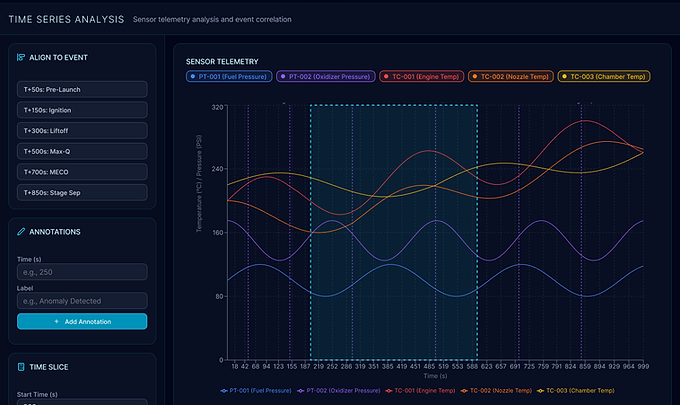
Following a test or flight event, engineers faced a significant bottleneck: the "Time-to-Insight." Research revealed that engineers were spending disproportionate time manually configuring complex plots and traces before they could even begin analyzing data. The goal was to transform a repetitive, manual setup process into a streamlined, high-performance interface for post-hotfire and launch reviews.
The Strategy: Targeted Discovery
To move beyond a generic dashboard, I led a targeted discovery phase focused on engineering efficiency:
-
Feature Prioritization: Conducted surveys and interviews to identify which manual tasks were the primary drivers of "analysis fatigue," discovering that plot setup was the single largest time-sink.
-
User Interviews: Engaged directly with engineers to identify the specific friction points where manual workarounds were slowing down the analysis pipeline
-
Iterative Prototyping: Developed interactive prototype to ensure user interface was intuitive. Worked closely with development engineers and customers to optimize the experience.
The Design Philosophy
-
Reducing Setup Friction: Redesigned the interface canvas to support Custom Saved Plot, allowing engineers to create, save, and instantly recall complex configuration templates for recurring test cycles.
-
Functional Expansion: Evolved the platform from a simple viewer into a comprehensive one, building out those specific features that supported time savings when conducting "quick-looks" and deep "ad-hoc" analysis.
-
Cross-Team Synergy: Partnered across product teams and development teams to design a shared UX/UI component, ensuring that analysis patterns would work in the broader ecosystem.
The Impact
The implementation of saved plot configurations is projected to shift the engineering workflow, to reduce setup time, and allow teams to focus on hardware qualification rather than tool configuration, with the goal of accelerating the speed of engineering decisions across the organization.